Event Control Screen
Last updated: June 30, 2026
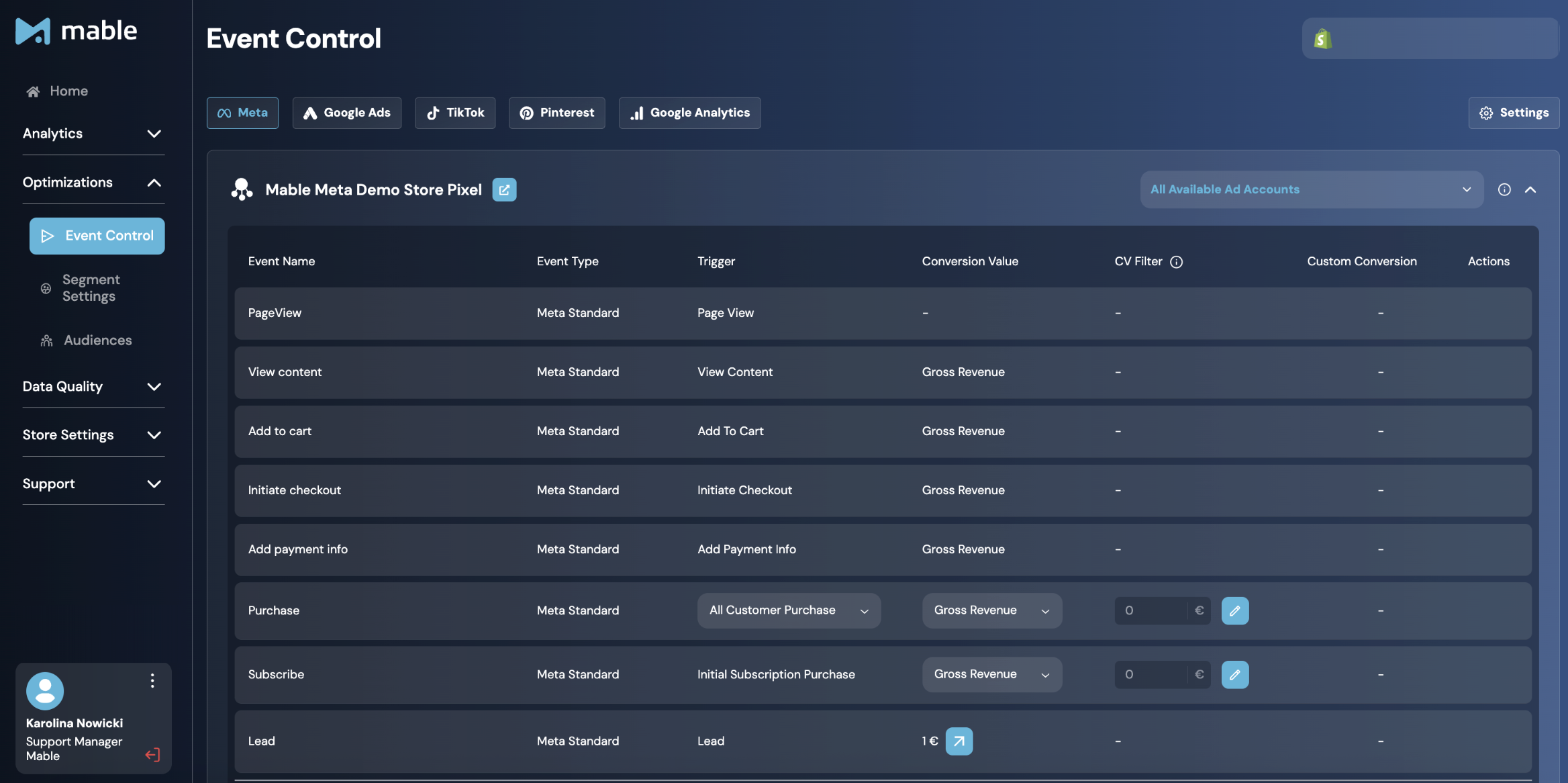
What is the Event Control Screen? What is it used for?
The Event Control Screen is where you manage which events are sent to your connected ad platforms, how those events are triggered, and which conversion value is attached to them.
It is configured per destination, such as Meta, Google Ads, TikTok, Pinterest, or Google Analytics, and per connected entity, such as a pixel, tag, or ad account, to control the event setup individually for each platform.
Event Control is mainly used for two things:
Optimization: Create or adjust conversion events that help advertising algorithms optimize toward the outcomes that matter most to your business, such as new customer purchases, higher-value orders, or profitability-based conversion values.
Reporting: Send events that help you analyze campaign performance inside the ad platform, even if you do not use those events for optimization.
With Event Control, you go beyond standard purchase optimization and reporting and unlock new optimization opportunities that are better aligned with your individual business goals.
By deciding which customer actions are used for optimization and reporting and which values are attached to them, you control the signals your advertising platforms receive. This makes it a key control layer for improving algorithm training, campaign reporting, and the overall quality of your optimization setup.
Where can you find the Event Control Screen?
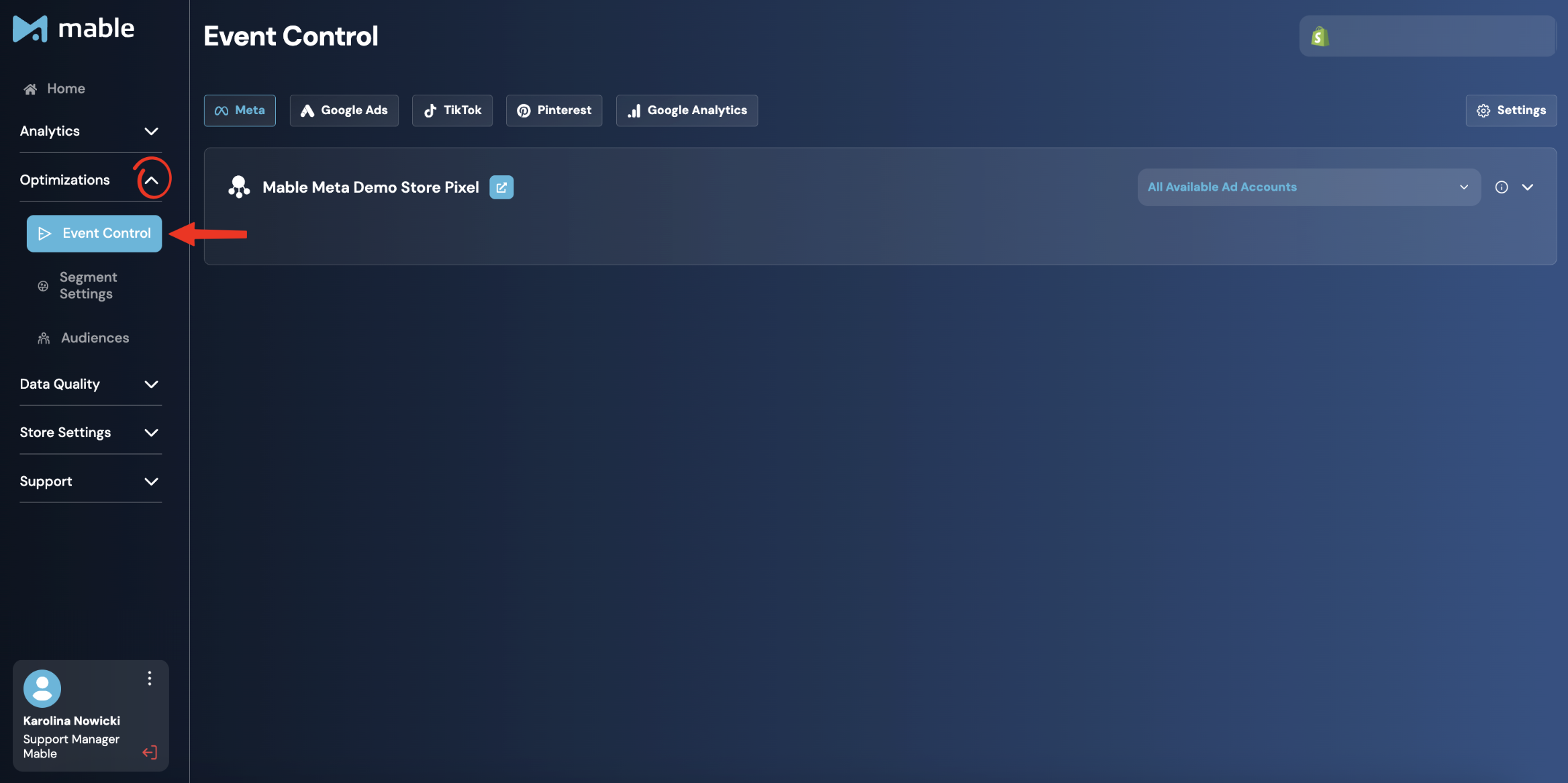
Go to: Optimizations → Event Control
How is the Event Control Screen structured?
Destinations & Pixel-level configuration
At the top of the Event Control screen, you can switch between your connected destinations, such as Meta, Google Ads, TikTok, Pinterest, or Google Analytics.
Each destination has its own event configuration, as every platform uses different events and optimization settings.
Within each destination, the Event Control Screen is showing events per connected pixel or destination connection. If multiple pixels are connected, each one appears as a separate configuration block and can be managed independently.
For Meta destinations, an additional Ad Account Selector is available. This setting determines in which Meta Ad Account Mable creates the Custom Conversions associated with Mable Standard Events and Mable Custom Events.
Settings Tab
The Settings Tab allows you to configure the New Customer Event Timeframe, which determines how long a customer is considered an existing customer before becoming eligible to be classified as a new customer again.
For more information about this setting and our recommended timeframe, please refer to the Event Control Screen Settings: New Customer Timeframe Guide.
Event types
Events in the Event Control Screen are organized into three categories:
Destination Standard Events
Standard events are predefined events required or supported by the respective ad platform, such as PageView, ViewContent, AddToCart, etc.
They are generally not editable, with the exceptions of Purchase, Lead events and Subscribe Events, which allow limited customization of the Trigger and Conversion Value. More information to be found in the section of Customization Ooptions in this article.
Mable Standard Events
Mable Standard Events are predefined events that are automatically created to all Mable Pro customers. They cover the most common customer and revenue use cases that are relevant for virtually every e-commerce brand, eliminating the need for manual setup or configuration.
The Mable Standard Events are:
AllCustomerPurchase
NewCustomerPurchase
ReturningCustomerPurchase
NetRevenue AllCustomerPurchase
These events enrich your platform data with Mable's customer and revenue logic and are used throughout Mable's analytics and optimization features.
Unlike custom events, Mable Standard Events cannot be edited. This ensures a consistent implementation across all Mable customers and allows Mable to guarantee that key optimization and reporting capabilities are always available.
This standardized approach provides several advantages:
Consistent event definitions across all Mable Pro accounts
Guaranteed availability of core optimization options, such as new customer acquisition campaigns
Reliable reporting based on standardized event names and logic
Faster onboarding, as no manual event configuration is required
Compatibility with Mable features that depend on specific event structures and naming conventions
Custom Mable Events
Custom Mable Events allow you to create optimization and reporting signals tailored to your business goals.
For each Custom Mable Event, you can define:
A trigger
A conversion value
Optional filtering rules
This allows you to optimize for more specific outcomes, such as new customer purchases, high-value orders, or profitability-based conversion values.
Event Components
Event Name
The name of the event that is sent to the destination.
The name is automatically generated based on the event configuration and cannot be manually edited. This ensures that event names remain consistent with their underlying logic and prevents accidental discrepancies between configuration and tracking.
For Meta, TikTok, and Pinterest, event names are fixed because these platforms do not support renaming conversion events. Changing the event name would effectively create a new event, causing reporting and optimization data to be split across multiple events.
Event Type
Shows whether the event is a destination standard event, a Mable standard event, or a custom event.
Trigger
Defines which action triggers that an event is sent. Examples are:
Examples of the Standard Event Triggers are:
Page View
View Content
Add To Cart
Trigger for Custom Mable Events include:
All Customer Purchase: Triggered on any customer purchase, regardless of type.
New Customer Purchase: Triggered when a customer makes their first purchase.
Returning Customer Purchase: Triggered when an existing customer makes another purchase.
Initial Subscription Purchase: Triggered when a customer starts a new subscription.
Recurring Subscription Purchase: Triggered when a new order is automatically generated through an active subscription.
Non-Subscription Purchase: Triggered when a customer makes a purchase of non-subscription products.
No Return: Triggered when the return window is over and no items of an order were returned.
Partial Return: Triggered when a customer returns part of an order.
Full Return: Triggered when a customer returns an entire order.
First Order Churn: Triggered when a customer cancels their subscription while only having one order in their order history.
Multi Order Churn: Triggered when a customer cancels their subscription while only multiple orders in their order history.
The trigger can only be modified for Mable Custom Events, and the purchase within the Destination Standard Events section. The reasoning behind these customization options is explained in the section about the customization options.
Conversion Value
Defines which value is attached to the event and sent to the advertising platform. This value can be used both for reporting and as an optimization signal.
Available value options include:
Gross Revenue: The actual sales revenue after discounts, but before taxes and operational costs.
Net Revenue: Is calculated by subtracting VAT or other sales taxes from Gross Revenue. Returns are not considered for calculating Net Revenue as Net Revenue is calculated by Mable the moment the order is placed.
Contribution Margin 1 (CM1): The revenue remaining after deducting the direct costs associated with the sold products (Cost of Goods Sold / COGS). CM1 provides a profitability-focused view of the order and helps optimize toward profit rather than revenue.
This value is used by the advertising platform for value-based optimization, value reporting, ROAS reporting, and ROAS-based targets when campaigns are configured accordingly.
Important: CM1 values can only be calculated if product cost data is available in Mable. This requires the COGS input to be configured and maintained correctly. Without COGS data, Mable cannot calculate or send CM1 values. Learn more about it in the guide on Cost Input for COGS.
CV Filter
Defines the minimum conversion value an order must have to be sent to the ad platform. Orders lower than the threshold will be filtered out and not sent to the ad platform.
Custom Conversion
This column is visible for Meta only and indicates whether Mable has successfully created the corresponding Meta Custom Conversion for the event. A ✓ means it was created successfully, while an orange retry icon means creation failed and can be retried (typically because of permission issues and can be fixed by refreshing the Meta Connection in the Destination Connection Screen).
Actions
Allows you to delete Custom Events. Destination Standard Events and Mable Standard Events cannot be removed, as they are required for core platform functionality, reporting, and analytics.
Customization Options
Customization of Standard Purchase Event
Unlike most Destination Standard Events, the standard Purchase event can be customized.
This allows you to modify the business logic behind the Purchase event without changing the event itself in the advertising platform. For example, you can adjust the event trigger, apply conversion value filters, or switch from Gross Revenue to alternative values such as Net Revenue or CM1.
The most common use case is changing the trigger from AllCustomerPurchase to NewCustomerPurchase. This allows brands to continue using the standard Purchase event as their campaign objective while training the advertising platform specifically on new customer acquisitions.
This approach is particularly valuable in scenarios where platform limitations make dedicated new customer events difficult to use:
Meta: NewCustomerPurchase events cannot be used as optimization events in Catalogue Ads. By changing the Purchase event trigger to NewCustomerPurchase, brands can continue using Catalogue Ads while optimizing for new customer acquisitions.
TikTok: Brands without access to TikTok's Custom Conversion Beta feature cannot optimize campaigns for custom events. In these cases, modifying the Purchase event is the only way to optimize campaigns toward NewCustomerPurchase behavior.
As a result, brands can continue using the Purchase event as their campaign's conversion goal while changing how purchases are measured, reported, and optimized. This enables them to align campaign optimization more closely with business objectives such as new customer acquisition, profitability, net revenue, or specific customer segments, without having to restart active campaigns.
Customization of Standard Lead Events
The Standard Lead event can also be customized, but it works differently from purchase events because leads do not inherently have a conversion value.
Instead, Mable uses a fixed Lead Event Conversion Value that is sent whenever a Lead event is fired. This value defines how much a lead is worth to your business and can be adjusted under Store Settings → Data Hygiene → Conversion Value Handling → Lead Event Conversion Value.
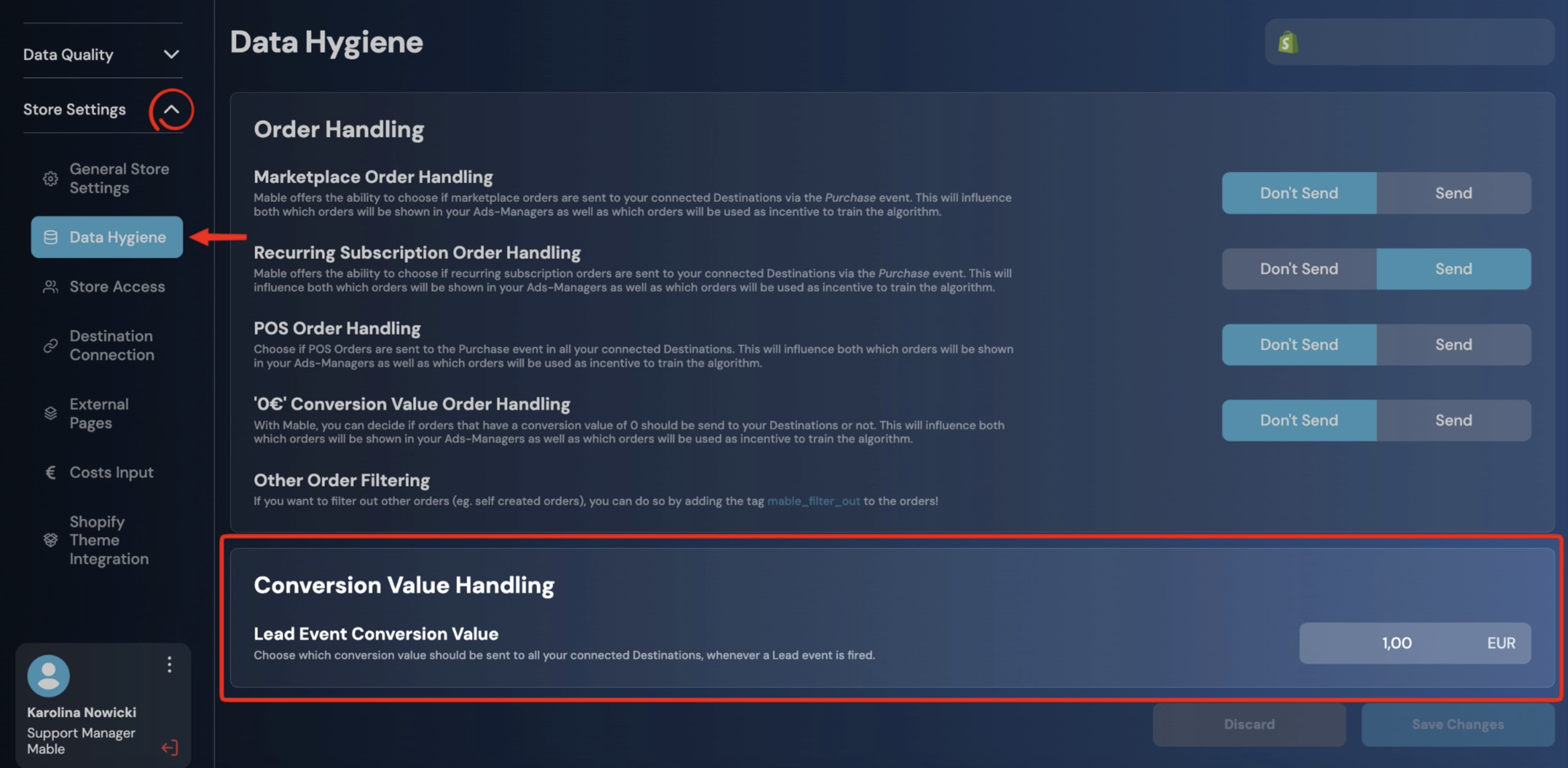
In Event Control, the Lead event displays the currently configured value and links directly to the corresponding setting.
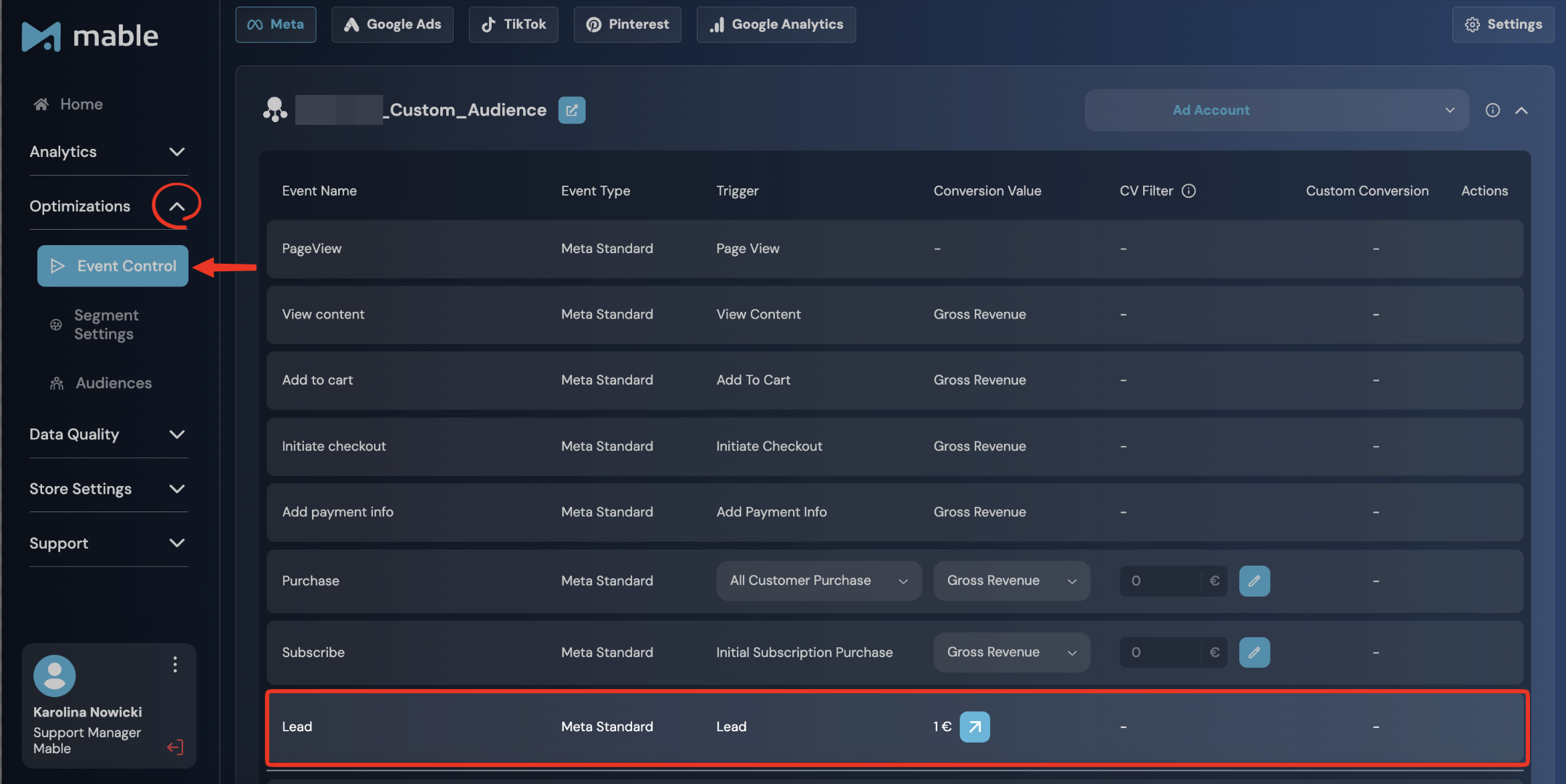
Customization of Standard Subscribe Event for Meta (only)
The standard Subscribe event can also be customized, but only for Meta. This allows you to modify the business logic behind the Subscribe event. The event fires on each new subscription order (trigger: "Initial Subscription Purchase") and reports it to the destination.
Under Conversion Value, you can switch from Gross Revenue to alternative values such as Net Revenue or CM1 (contribution margin 1). You can also apply a conversion value filter (CV Filter) to define the minimum value required for the event to be sent so that only subscription purchases above a certain threshold are reported.
Custom Mable Events: why do you need them and how do you create them?
Custom Mable Events allow brands to create event logic that goes beyond Mable Standard Events. They are mainly used when a brand needs a specific reporting view or optimization that is not covered by predefined events.
An important use case is profit-based optimization (CM1 events), which is not part of Mable Standard Events and therefore needs to be created as Custom Mable Events. This allows brands to analyze and optimize campaigns based on contribution margin instead of revenue alone.
Custom Mable Events can also be used for return-related and subscription-related use cases, such as tracking purchases after returns, excluding refunded revenue, or separating subscription purchases from one-time orders.
One of the key advantages of Custom Mable Events is that you can combine multiple conditions into a single event. For example, instead of optimizing for all new customer purchases or all CM1 purchases, you can create a CM1 NewCustomerPurchase event that optimizes specifically for profitable new customer acquisitions.
Using Custom Mable Events together with profitability-based values and CV Filters allows brands to:
train algorithms on economically meaningful purchases
avoid optimization bias toward low-ticket products
improve alignment between campaign optimization and business goals
create profit events, such as CM1-based purchase events
distinguish between revenue, margin, return, and subscription logic
report on business metrics that are closer to actual profitability
Custom Mable Events are therefore not only an optimization tool. In many cases, they are equally important for reporting, because they allow brands to measure performance based on the metrics that actually matter to the business.
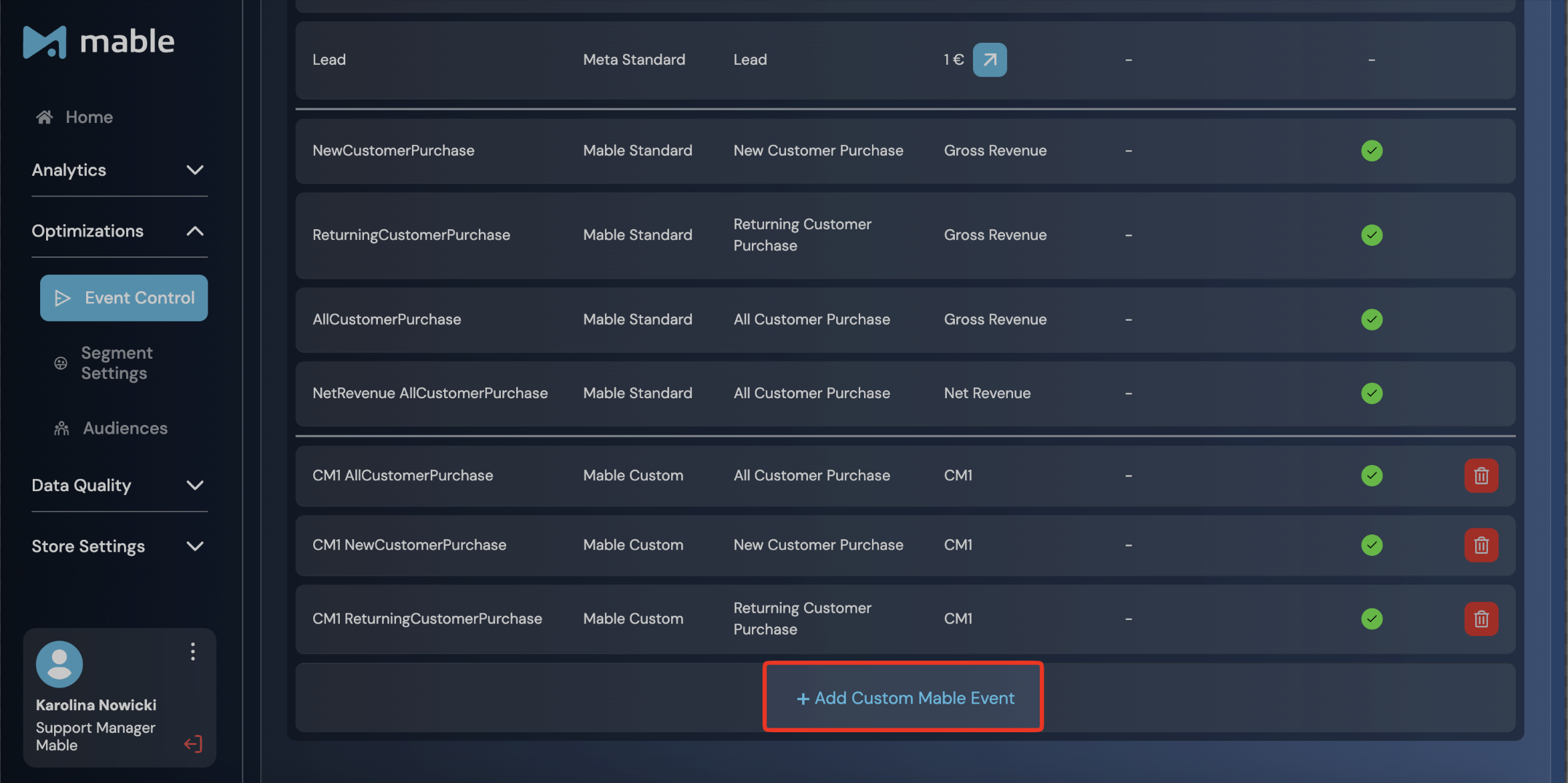
How to create Custom Mable Events step-by-step
Click on “Add Custom Mable Event”
Enter all the relevant information (select trigger, select conversion value, select CV filter) Find detailed information in the section about the event components of this article.
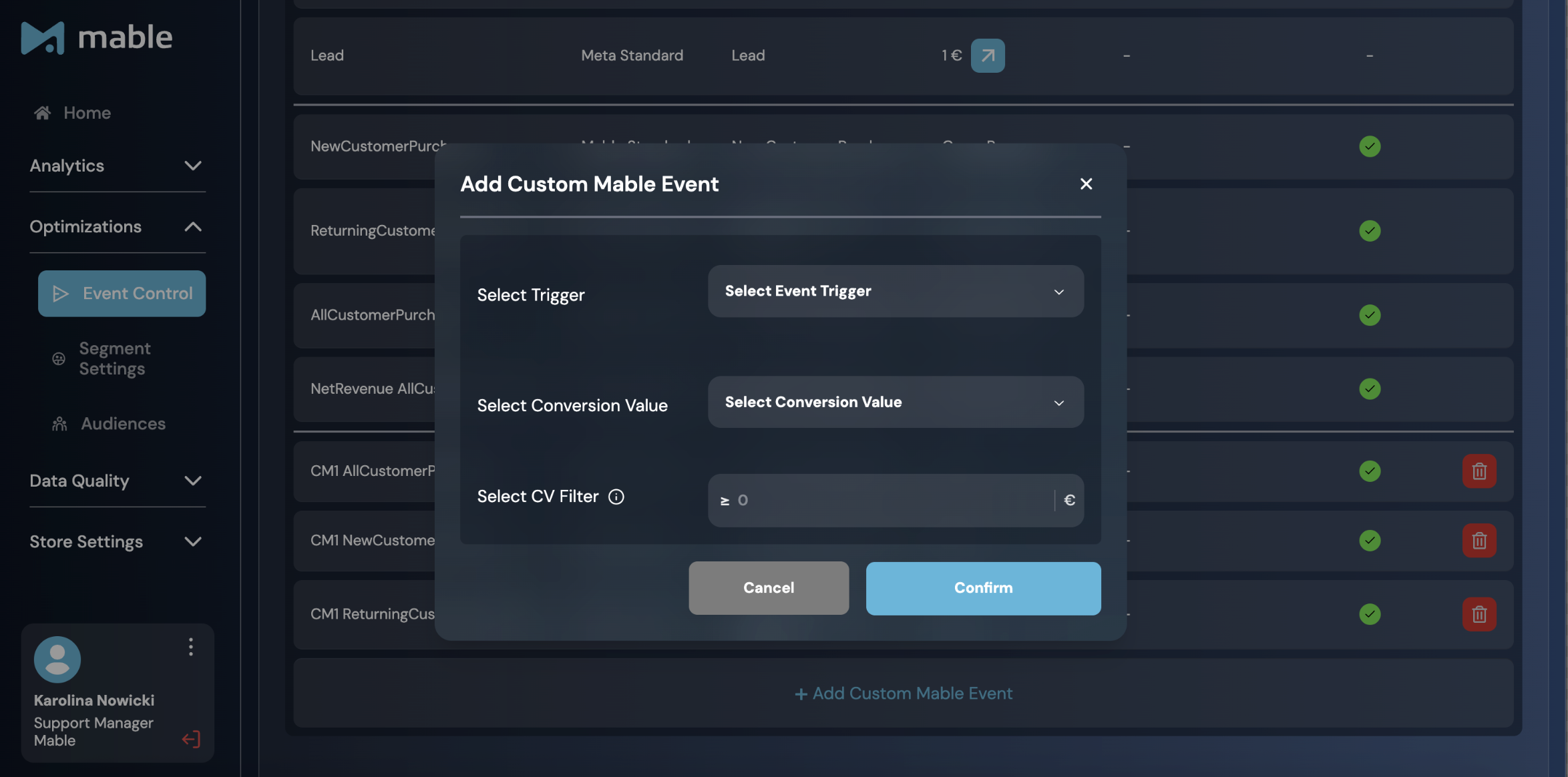
Click “Confirm”